ELN – Electronic lab notebooks
For continuous data management according to the FAIR principles, our researchers can rely on support for different electronic lab notebooks (ELNs) provided by the CRC1333 or by their institution.
We offer a CRC1333 version of the open-source software Chemotion ELN which is being developed by the working group of Stefan Bräse at KIT. The University of Stuttgart as well as the Ruhr University of Bochum offer individual instances of eLabFTW, while at the MPI-FKF Sciformation is being used as an ELN.
About Chemotion ELN
How to use the CRC 1333 – Electronic Lab Notebook (ELN): Chemotion
First steps
- Make sure to work from within the VPN area of a CRC partner (University of Stuttgart, MPI-FKF, University of Paderborn, TU Dresden) or log into a VPN client of one of these institutions.
- Visit eln.crc1333.de to sign up for an account
- Please use an abbreviation with at least three characters to reduce the risk of another person using the same abbreviation. This cannot be changed afterwards! The abbreviation you choose has to be identical with your naming convention for the analytical data!

Be carefull – login page correct?
DO NOT log in via the general chemotion webpage (looks similar)!! Your data would then not be on our server!
- You can now log in to your electronic lab notebook at eln.crc1333.de.
- For a video introduction to chemotion you can visit chemotion.net.
Also Non-CRC 1333 members from University of Stuttgart are very welcome to use CRC1333-Chemotion. Please let us know if you are interested, so we can adjust our storage quota accordingly.
Automatic synchronization of analytical data:
We will step by step integrate an automatic synchronization of analytical data from different sources with the ELN-server. Thereby, analytical data will be automatically uploaded to your Chemotion account as soon as you measure a sample named with your personal abbreviation. It will then pop up in your account and you can then easily “drag and drop” the analytical data to your experiment.
To use this functionality, it is mandatory to start the name of the analytical data with the chosen abbreviation followed by “-” e.g. ABC-R13-A
Data Security & Backup
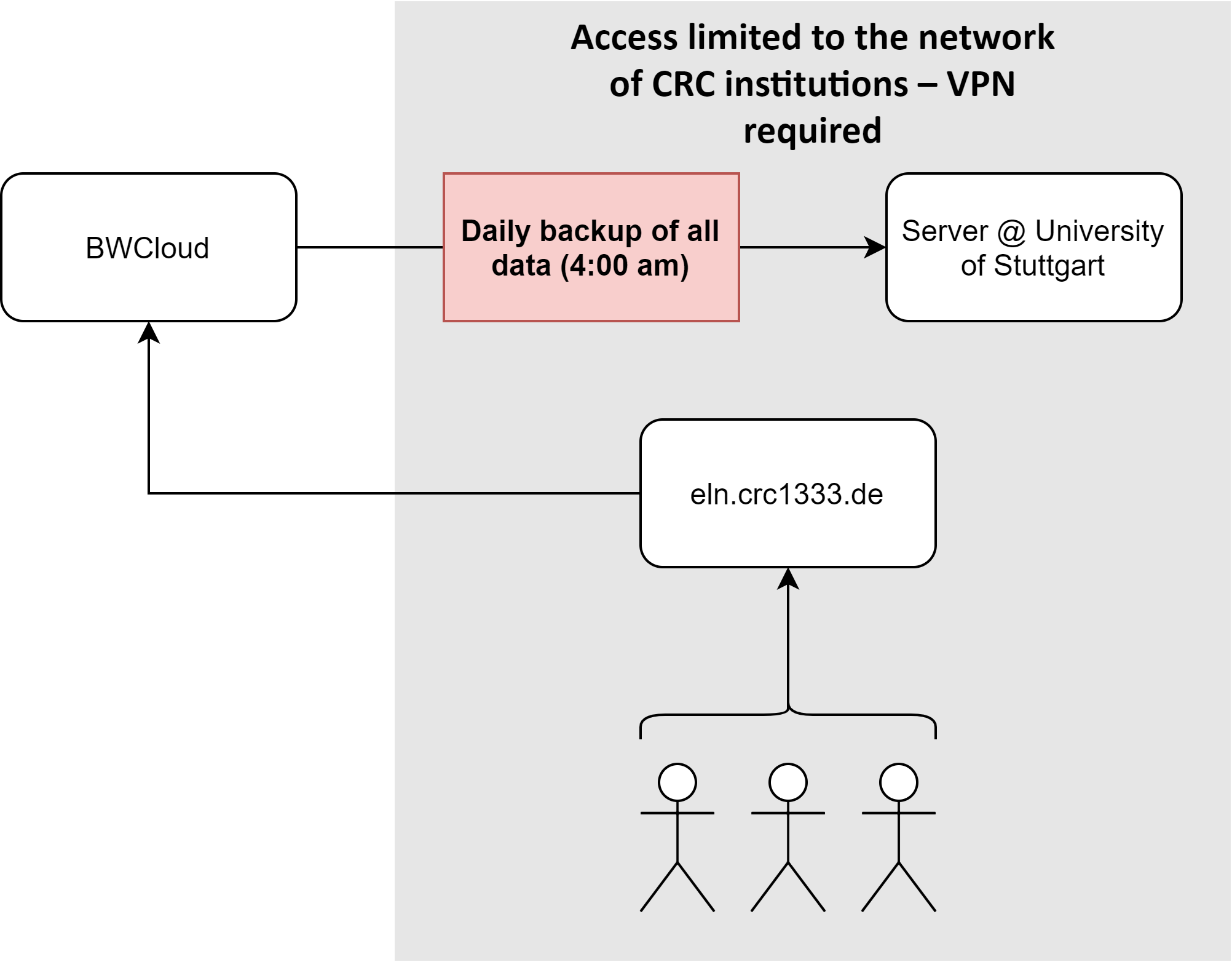
To ensure the security of the data, a backup of all data is performed every day at 4 am. This backup is stored on two different servers, one of them locally at the University of Stuttgart.
Generally access to the ELN is only possible from within the network IP areas of the CRC institutions.
ELN – Quick guide
To get started with Chemotion please watch the following video tutorials:
Part 1: Add collections
Part 2: Add reagents
Part 3: Plan a reaction 1
Part 4: Plan a reaction 2
Part 5: Import structures from SDF (e.g. from ChemDraw)
Part 6: Import structures from Excel

Before you add your data, please make sure you run the CRC 1333 installation of Chemotion –> Look for the CRC logo as browser icon!
Thereby, your data will be saved at the University of Stuttgart and you will be able to share data with your colleagues
To make sure you report your data according to FAIR principles, please always upload two files of your analytical data:
- An image file (*.png, *.jpg) to be able to visualize your data in the ELN
- The original primary data of your analytical measurements
Preferably use open data formats (e.g. JCAMP-dx) or text based formats (e.g. *.csv, *.txt, *.xlsx). If these are not available please upload the data in the available proprietary data formats (e.g. *.qps for your physisorption data, “BRUKER zipfiles” for NMR data, …).
ELN – FAQ
Please ask your supervisor to use “Programmpauschalen-Mittel” from the CRC 1333 to purchase Laptops or Tablets to be used for protocolling your experiments digitally in the labs. If this is not successful, please let us know via sfb1333[at]ipoc.uni-stuttgart.de.
The CRC 1333-ELN is directly accessible from the IP areas of all our member institutions: University of Stuttgart, MPI-FKF, University of Paderborn and TU Dresden. Thus, all CRC 1333 members can access the ELN from their home institution without using a VPN client. Accessing the ELN from your home you have to login to the VPN client of one of the CRC 1333 institutions.
No, PDF and TIF formats are not supported for visual representation. Please upload the files you want to see represented as enlarged images in PNG or JPG format. PDF files will be supported after the next Update (Status: Jan-2021)
No, not at the moment. Please use PNG or JPG files to visualize the data in Chemotion and please additionally upload the ASCII file for archiving. In the future, there will be a tool that converts the text-based formats ASCII, csv and excel to JCAMP-DX which will make representation and editing of those files possible.
Yes, the plugin “ChemSpectra/Spectra Viewer” enables you to view and edit NMR, IR and mass spectra within Chemotion. Additionally, it willl automatically convert your BRUKER-NMR data from the zip-file to an open file format (JCAMP-DX) making your data comply with “FAIR” principles in the process. IR and mass spectra currently have to be uploaded as JCAMP-DX in the CRC 1333 Chemotion-installation.
Yes, just use the structure template function within the “Ketcher Chemical Structure Editor”. The “single star” button will save your structure as a template. The “four star” button will show you all your template structures to choose from. Additionally you can duplicate and edit existing reagents/ chemicals or import structures from Chemdraw (see: https://www.youtube.com/watch?v=-Tvzy9u-Ke4&feature=emb_logo).
Structures of this size can currently not be drawn for technical reasons. Please use the research plan option to protocol experiments with polymers of this size. In 2021 the new “Generic element tool” will be released which will then make it possible to use chemicals in a reaction with “non-standard” features (e.g. polymers with n> 200,materials where no structure can be drawn, …)
Please put this value into the free-text description field.
Please put this value into the free-text description field.
Please tick the checkbox in the experiment list first. Then the report function works (green-coloured field, paper and pen).
Yes this is possible via the light blue button. You can choose permission levels and share with individual Chemotion Users or groups. Groups need to be created by the Admin. (Contact Frau Rüthlein)
With the current planning tool for chemical reactions this is not possible. Therefore, please use the “research plan” option for planning experiments using materials. In 2021 the new “Generic element tool” will be released which will then make it possible to use chemicals in a reaction with “non-standard” features (e.g. polymers with n> 200; materials, where no structure can be drawn, …) . The Admin will then be able to implement such new template forms for materials according to your needs.
Please use the “Research Plan” option to make notes about non-synthetic experiments. There you can already find the option to fill in a table. This table function will be extended by further “Excel-like” functionality. We will let you know as soon as there is anything new.
Not at the moment. However, there is a button to download all files belonging to one analytical measurement.
Shortcuts are supported as far as the browser supports them for full-text input fields.
ELN – Contact
Project Management:
Dr. Elisabeth Rüthlein
Admin/ Technical Support:
Technical Lead:
Internal Backup:
User questions:
Please post user questions to the community via the Slack-channel, #chemotion-eln.
Official Documentation: